Upload 1–3 photos and generate your own hilltop trio dance video. This Wassup Dance AI video generator recreates the mountain-side version of the Wassup in a Minute AI trend, with four scenes, the reference moves and original audio. Choose your cast, create the dance and download your MP4—no filming or dance practice needed.
1–3 photosFour scenes · ~13 seconds768P · $6.90
Choose your hilltop trio
Required · leads the close-up in scene 02.
Optional · leave empty to keep the source dancer.
Optional · closest to camera in scene 01.
HD
Landscape 4:3 · about 13 seconds · four scenes · original reference audio · fixed 768P video
Credits return automatically if generation fails.
WATCH THE TREND
Wassup Dance AI examples on TikTok
Explore these two creator videos for inspiration. To make your own, use the photo uploads above; your video follows the four-scene hilltop preview.
If an embedded video does not load, open its original TikTok post using the link below the player.
THE TREND BEHIND THE TOOL
Make the Wassup in a Minute AI dance with your photos
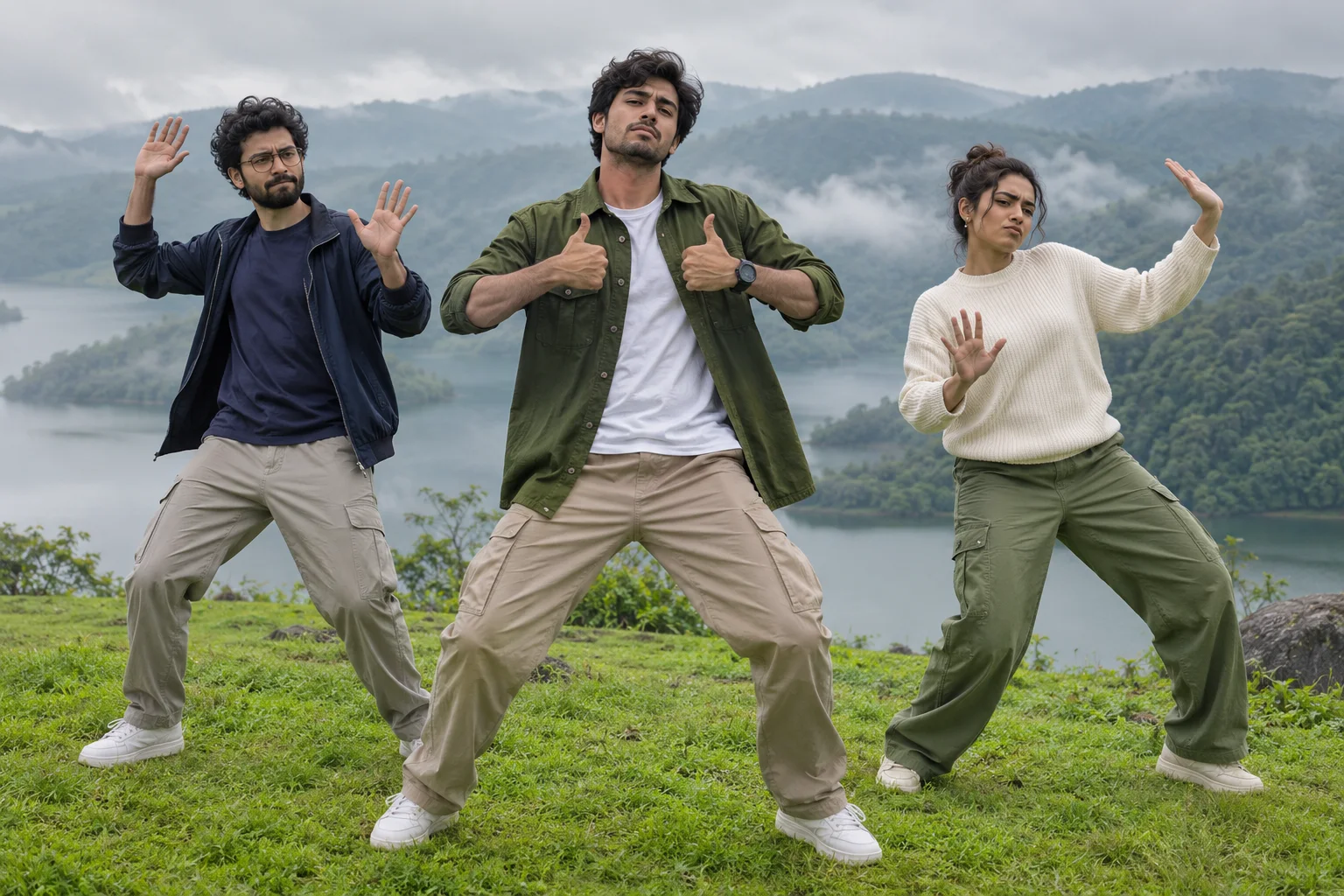
Wassup Dance AI follows the Wassup in a Minute AI trend. This generator focuses on its hilltop trio variation: three straight-faced dancers, a misty mountain lake and a short routine that cuts from a layered group shot to the center performer before the trio moves together again.
Use the upload form above to put yourself in the center role, then optionally add a friend on either side. The tool handles the four-scene edit, dance motion and final video assembly. You do not need to write a prompt, record yourself dancing or piece the clips together in another editor.
Original AI-created illustration · fictional cast · scene guide, not a generated video result.
FOUR CUTS, ONE CAST
The hilltop dance, scene by scene
Each shot begins with its own reference first frame. Your selected people keep the same roles across the close-up, wider shot and final turn; the four clips are assembled in source order.
01
The layered entrance
Three dancers fill different depths of the frame, with the right performer nearest the camera. The rolling hillside sets up the whole joke.
02
The center close-up
The lead steps into focus for the hand and chest gestures while the left and right dancers stay visible behind. Your center photo owns this moment.
03
The full-trio groove
The camera opens out to all three bodies. Follow the steps, shoulder rhythm and arm movement together against the lake and wooded slopes.
04
The side-facing finish
The trio turns for the final beat. The edit keeps this shorter ending instead of stretching it to match the other shots.
Original AI-created illustration · fictional cast · scene guide, not a generated video result.
FROM PHOTO TO DANCE
How to use the Wassup Dance AI Video Generator
Start with your photos and finish with one downloadable dance video. The hilltop choreography and four-scene format are already set up for you.
01
Upload the lead
Pick a sharp solo portrait for the center role. A clear face and visible shoulders help establish identity and clothing in both close and wide shots.
02
Invite the other two
Add a separate photo to either optional slot. Leave one or both empty to retain those original source dancers. Screen-left and screen-right labels make casting explicit.
03
Create your dance
Confirm photo permission and start generating. The tool creates your personalized hilltop dance at fixed 768P quality, keeping each person in the role you selected.
04
Download and share
Receive one landscape MP4 of about 13 seconds with the reference audio and original scene order. Download it from the result card or My Videos.
BETTER PHOTOS, CLEARER FACES
Give every dancer a clear starting point
Use one person per photo. The model must carry the same identity through head turns, a close-up and a wider body shot. Clothing visible in your portrait guides the recast outfit, so avoid covering the neckline and shoulders.
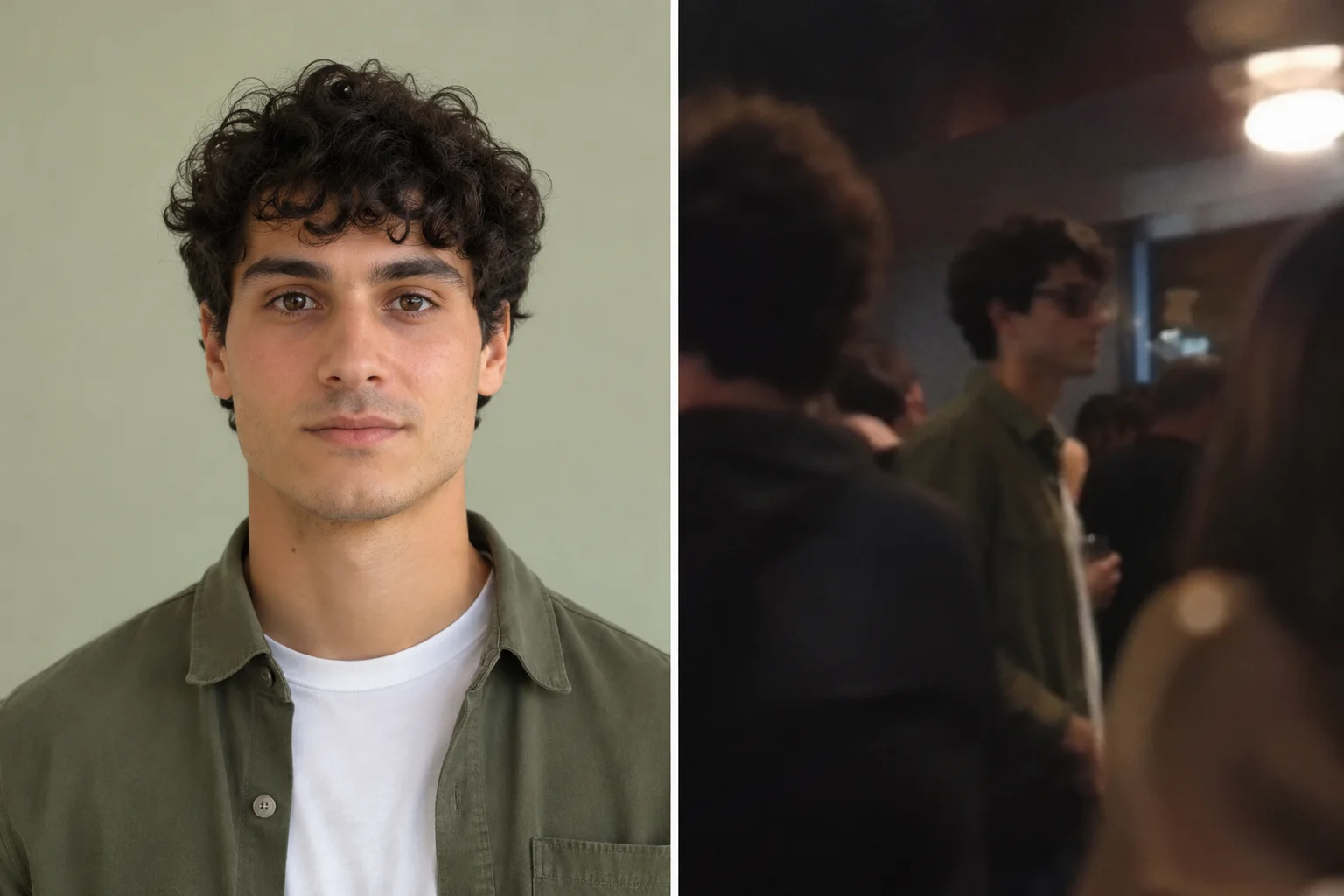
AI-created photo guide: clear portrait on the left; distant, obscured face on the right.
Photos that help
One face, sharp eyes and even light.
Front or slight three-quarter angle; shoulders visible.
A separate authorized portrait for each selected role.
Photos to skip
Group photos with several possible faces.
Heavy filters, sunglasses or hands hiding the face.
Tiny subjects, motion blur or extreme side profiles.
WASSUP IN A MINUTE AI · THE HILLTOP VERSION
From Wassup in a Minute AI to the hilltop trio dance
The hilltop trio dance is one variation of the Wassup in a Minute AI trend. With LivelyReel's Wassup Dance AI video generator, you can recreate that version from photos. The preview shows the routine this tool follows: a center close-up, three-person choreography and a misty outdoor setting. Other edits of the wider trend can use different characters, scenes or formats.
The landscape is part of the punchline
Soft fog, still water and a green hillside make the synchronized gestures unexpectedly funny. The background stays tied to the reference instead of becoming a generic dance studio.
Three roles, not three copies
The center performer leads the close-up, the left dancer anchors one side and the right dancer opens closest to camera. Separate photo roles help prevent accidental identity swaps.
Short cuts carry the rhythm
The four shots are not equal in length. Keeping their original timing preserves the shift from group depth to close-up, full-trio movement and the quick final turn.
The linked effect page documents this hilltop variation; it does not establish the first creator or a launch date. Hilltop variation reference ↗
BEFORE YOU TRY AGAIN
Small fixes for a better hilltop edit
The face looks different between shots. What helps?
Start with a sharper portrait without beauty filters, masks or heavy shadows. Use the same photo for that role throughout. AI identity matching can still vary during fast turns and distant shots.
Can I change the dance or make it vertical?
This template keeps the four supplied shots, choreography and landscape 4:3 framing. For a vertical post, place the finished clip on a vertical canvas in your editor instead of cropping a dancer out.
One scene is taking longer. Do I need to restart?
No. Completed scene images and clips are saved. Confirmed temporary provider failures retry only the affected part, with limited backoff. Do not submit a second order while your first video is processing.
The hands or outfit have small artifacts.
Choose a portrait with visible shoulders and simple clothing. Fast arm movement and body parts not visible in the upload require AI reconstruction, so small imperfections remain possible.
READY FOR THE GROUP CHAT
Let the scenery do the setup
Keep the opening wide enough to see all three people. A short caption works well because the contrast between the quiet lake and the dance already tells the story. Try one of these original captions.
Label the clip as AI-generated when sharing, follow platform rules, and check that you have the necessary music and photo permissions. Template access does not grant music rights.
Wassup Dance AI Video Generator FAQ
What is the Wassup Dance AI Video Generator?
It is an online photo-to-video tool for creating the hilltop trio version of the Wassup in a Minute AI trend. Upload a center portrait, optionally add left and right portraits, and generate one four-scene dance video with the reference choreography and audio. You receive a downloadable MP4.
Do I need three photos?
No. Only the center lead photo is required. Add a left dancer, a right dancer or both. Empty optional slots keep the corresponding source dancers; a single photo is not cloned onto all three people.
How much does one video cost?
One video costs $6.90 USD as a one-time purchase, with no subscription required. The dedicated purchase adds 35 credits; generation uses 35 credits. Existing credit holders can use their balance.
What format and resolution will I receive?
One landscape 4:3 MP4, about 13 seconds, assembled from four scenes with the original reference audio. H3 generation is fixed at 768P; there is no 2K or higher-resolution option for this template.
What happens if a scene fails?
Confirmed busy or generation-timeout failures retry only the affected scene after 30, 60 and 120 seconds, up to three replacements. Successful work stays saved. Unknown submission acknowledgements are checked rather than blindly repeated. If the job ultimately fails, credits return automatically.
Can I use this for TikTok, Reels or Shorts?
You can download the MP4 and prepare it for your chosen platform. Keep all three dancers visible, disclose AI-generated media where required and use only photos and music you are authorized to share. Results can contain AI artifacts and are not guaranteed to go viral.
LivelyReel is an independent AI tool, not affiliated with TikTok, the source performers or any original creator. New page illustrations are fictional AI artwork; the playable reference shows the supplied source footage. AI results vary.