Robert Pattinson is the new James Bond. Now give yourself the reveal: step out of the shadows with your own face, hairstyle and outfit, while keeping the original aiming pose, camera movement and atmosphere.
HD Video · 768p9-second revealOriginal reference audio
Who steps out of the shadows?
Required. Replaces the only person in the clip, including their hairstyle and visible clothing.
HD
9 seconds · 4:3 landscape · HD 768p · Original reference audio
Credits returned for confirmed generation failures.
A SMALL SCENE. A BIG ENTRANCE.
Your take on the new James Bond reveal
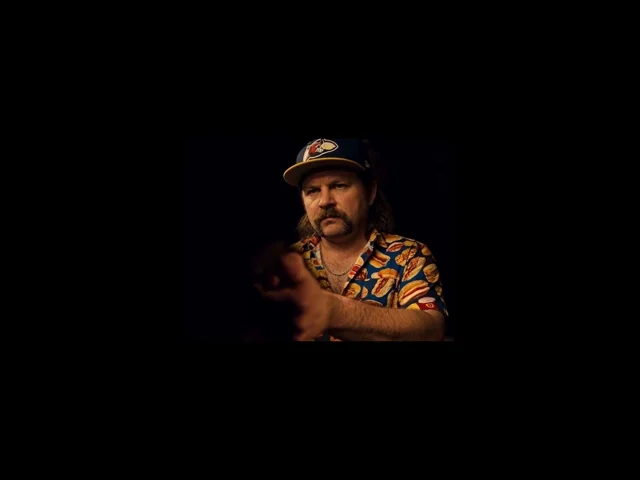
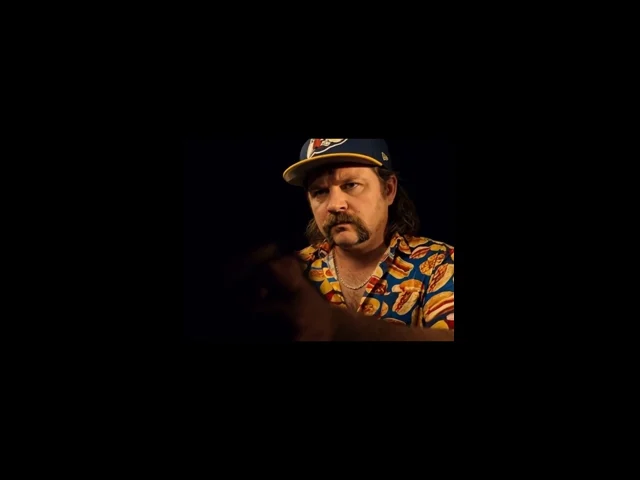
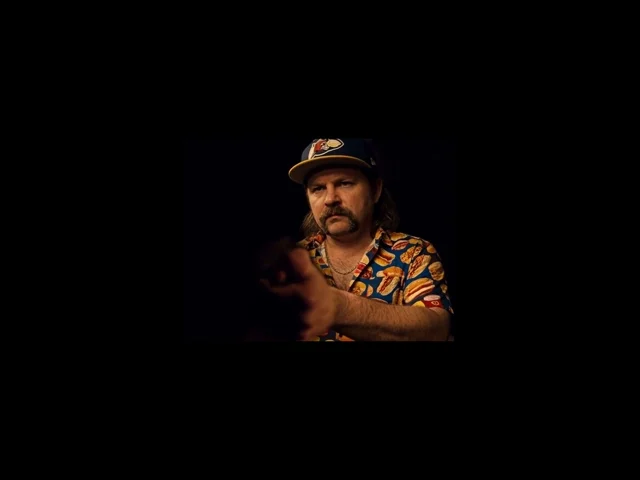
A hand and a held pistol emerge from a nearly black frame. Warm light gradually finds the face; the eye line stays intense before the final turn. The appeal is the build-up: recognition arrives a beat after the pose.
Put yourself at the center of that moment. The reference supplies the performance and atmosphere, while your photo supplies the person and their look. A casual shirt, a favorite jacket or your own dressed-up outfit becomes part of the reveal.
This AI-generated example was supplied for this page. Your video uses your uploaded appearance; AI details may vary.
A NEW FACE FOR 007 · NOVEMBER 2026
Robert Pattinson is the new James Bond
Amazon MGM Studios announced Robert Pattinson as the next James Bond on November 16, 2026. Denis Villeneuve will direct the next film, with Steven Knight writing the screenplay. This is the start of a new 007 era following Daniel Craig.
Why this new Bond reveal makes a strong video template
Coverage of the announcement describes Pattinson emerging from the shadows with a gun. The supplied reference uses that same visual hook: the aiming pose arrives first, the face catches the light, and recognition becomes the payoff. The drama comes from revealing who is there.
From Robert Pattinson’s reveal to your own entrance
Your version gives that reveal a personal twist. Put a familiar face and everyday outfit into the cinematic setup, or use your favorite dressed-up portrait. The contrast works because the pose and lighting feel larger than life while the person is recognizably you.
Casting context checked November 17, 2026. LivelyReel is an independent AI tool; generating a clip does not create an official Bond appearance or endorsement.
Three moments that make the scene
01
Start in the shadows
The hand, sleeve and pistol establish the pose before the face becomes clear. The darkness belongs to the scene.
02
Let the light find you
The face emerges into warm side light. Your identity and hair should stay recognizable without flattening the original contrast.
03
Disappear into the shadows
Follow the final withdrawal out of the light until the person disappears and the scene ends nearly black.
CAST YOUR OWN VERSION
One reveal, plenty of ways to use it
These are ideas for your own video. The stills on this page all come from the supplied reference.
01
Your unexpected audition
Give your everyday look a dramatic entrance. Share it as your own playful spy audition with an AI label.
02
A friend’s main-character moment
With their permission, use a friend’s clear portrait for a birthday message or an inside joke in your group chat.
03
A wardrobe with a story
Use an outfit people recognize you by. The contrast between familiar clothes and the cinematic pose makes the reveal personal.
ONE PHOTO. ONE ROLE.
Your look replaces the protagonist
Upload a solo portrait for the only person in the reference. There is no second role to fill and no left/right assignment to manage.
From your uploaded photo
Face, hairstyle, visible clothes and accessories. Include your shoulders and upper chest so the model can read the outfit instead of guessing.
From the reference clip
The held pistol, aiming pose, hand positions, head movement, gaze timing, dark background, warm light and camera framing stay tied to the source.
The original dinner jacket and bow tie are not the default costume. Upload the outfit you want to appear in; exact fabric, logos, jewelry and fine details can still vary.
FROM PHOTO TO REVEAL
Create your James Bond reveal in four steps
01
Choose your portrait
Use one clear solo photo showing the face, hair, shoulders and the outfit you want in the clip.
02
Check permission
Confirm you have permission to use the photo and make a video featuring the person pictured.
03
Sign in and generate
Use 30 existing credits or buy the $5.90 credit package. Your saved photo stays with you through sign-in and checkout.
04
Download your MP4
Follow progress in My Videos. When it is ready, download your reveal and review it before sharing.
GIVE THE REVEAL A CLEAR START
The best photo shows both your face and your outfit
You do not need to hold a prop or copy the aiming pose. The reference already supplies those movements. A well-lit portrait is a better identity reference than a dark imitation of the scene.
Choose a photo like this
One person, a sharp face and a visible hairline.
Head and shoulders with enough upper-body clothing to show the outfit.
Even light and a front-facing or gentle three-quarter angle.
Avoid these inputs
Group shots, tiny faces, heavy filters or blurred screenshots.
Sunglasses, hands or objects hiding the eyes and face.
Tight face-only crops if you want a specific outfit reproduced.
Upload JPG or PNG, up to 10 MB. One photo is required. No prompt-writing or video editing is needed.
THE HISTORY BEHIND THE NEW BOND
James Bond history: from Ian Fleming to Robert Pattinson
Before the films, there was the book. Ian Fleming introduced James Bond in Casino Royale, published in 1953. The character’s combination of espionage, danger and style became the foundation for a screen identity that would be reinterpreted across generations.
The official film series began with Sean Connery in Dr. No (1962). Six actors led the 25 films released through No Time to Die (2021). Robert Pattinson has now been announced as the next lead, carrying the role into a new chapter.
James Bond actors in order: the official film series
Daniel Craig’s five-film run began with Casino Royale in 2006 and ended with No Time to Die in 2021. Pattinson follows that completed era. His casting is confirmed; the next film is an upcoming production, rather than an already released Pattinson Bond movie.
Why the face reveal matters in Bond history
A change of Bond actor makes a familiar character feel new again. A short reveal can express that handover without a full trailer: silhouette, posture, light and a face. For your AI version, those same elements create an introduction people can recognize in seconds.
The actor timeline above covers the official film series. Earlier television portrayals and separate film adaptations are outside this list. The supplied clip’s exact soundtrack title remains unverified.
THE NINE-SECOND PERFORMANCE
Keep the pose. Make the person yours.
The reference sets the timing and framing. Your photo changes the protagonist’s appearance and clothing, while the original audio returns in the delivered MP4.
Reference time
What happens
0–2 seconds
A held pistol and outstretched hands occupy the foreground; the face is mostly concealed by darkness.
2–4 seconds
The protagonist’s face comes into warm light while the aiming posture remains steady.
4–7 seconds
A close, intense eye line holds the reveal, with small expression and head movements.
7–9 seconds
The protagonist withdraws from the light and disappears into darkness before the final frames.
AI follows the reference but does not guarantee frame-perfect hands, facial expression, identity or fabric. Inspect the full result, especially the dark opening and final turn.
A BETTER INPUT, A CLEARER REVEAL
Before you try another photo
My face looks unclear in the opening.
The reference deliberately hides the face at the start. Judge resemblance after the face emerges. If it stays unclear, use a sharper portrait with visible eyes and hair.
My outfit does not look quite right.
Use a photo that shows the actual collar, sleeves and upper-body outfit. A face-only crop cannot describe clothing that is outside the image. Complex logos and jewelry can vary.
The hands or pistol look different.
The template asks for the original prop placement and aiming pose, but small hand and prop details can change in AI video. Review those details before posting; exact duplication is not guaranteed.
The video is still processing.
Typical processing is 4–10 minutes and may take longer at peak times. Check My Videos rather than submitting again. You can leave the page; completion email is sent when the video is ready.
READY FOR YOUR ENTRANCE
Share the reveal with a little context
Let the shadow-to-light moment play before your caption gives it away. Make clear it is an AI creation and get permission before tagging anyone featured.
The MP4 is 4:3 landscape. For a vertical post, add space above and below rather than cropping away the hands or face.
Check the sound before sharing
The reference audio is retained. This template does not add a new song or clone a voice. Generation fees do not include a separate music or franchise license; follow your platform’s rules for your intended use.
ONE REVEAL. ONE CLEAR PRICE.
Create your video for $5.90
The dedicated one-time package adds 30 credits. One James Bond Reveal generation uses 30 credits; if you already have enough, use your balance.
James Bond Reveal
$5.90
One-time credit purchase · No subscription required
Credits are returned for confirmed generation failures. An aesthetic variation is not automatically a technical failure. Check My Videos for the final task and credit status.
James Bond Reveal AI Video Generator FAQ
What to upload, what stays from the reference and what to expect from the result.
What is the James Bond Reveal AI Video Generator?
It turns one portrait into a personalized version of the supplied nine-second reveal, inspired by the new James Bond entrance. Your face, hair and outfit replace the protagonist while the source guides the held-pistol pose, movement, camera, light and timing.
How many photos do I need?
Exactly one solo photo. There is only one character to replace, so you do not need a second portrait or a role assignment. A clear head-and-shoulders photo with visible clothing works best.
Will I wear the original tuxedo?
The template uses the outfit in your uploaded photo, not the original tuxedo. Include the clothes you want to see. Details outside the crop must be inferred, and exact fabrics, accessories and logos may vary.
Does it keep the pistol and aiming pose?
Yes. The reference guides the held pistol, its position and direction, the aiming posture and hand placement. Only the person’s appearance and clothing are recast. AI may still introduce small hand or prop differences.
Do I need to pose with a gun in my photo?
No. Upload a normal portrait showing your face, hair and upper-body clothing. The original clip supplies the prop and pose; your portrait supplies the person and their look.
Can I use a friend’s photo?
Yes, if you have permission to use that photo and create a video featuring them. Confirm permission before generating and review the result with them before posting or tagging them.
Can I upload a group photo?
Choose a solo portrait instead. This is a one-person template, and a group image makes the intended identity ambiguous. Crop to one person while keeping enough of the outfit visible.
What photo formats are supported?
JPG and PNG up to 10 MB. Prefer a sharp, evenly lit face, visible eyes and hair, and a front or gentle three-quarter angle. Avoid strong filters, face coverings and very tight crops.
How long is the finished video?
The scene is fixed at nine seconds, matching the supplied reference performance. This page does not offer custom scene lengths, extra shots or a longer trailer.
What are the aspect ratio and quality?
The template uses fixed 4:3 landscape framing and HD 768p generation. Higher-resolution options are not offered for this template. For vertical platforms, keep the full frame inside a vertical canvas.
Does the video include sound?
Yes. The delivered clip restores the original reference audio. There is no new dialogue, custom soundtrack selection or named-artist voice cloning on this page. The exact soundtrack title has not been verified.
Is Robert Pattinson the new James Bond?
Yes. Amazon MGM Studios announced Robert Pattinson as the next James Bond on November 16, 2026, with Denis Villeneuve directing the upcoming film. This independent generator lets you personalize the reveal format with your own photo; it is not an official casting tool or franchise endorsement.
Do I need CapCut or a written prompt?
No. Upload your portrait, confirm permission and generate. The scene and prompts are fixed. You may edit the downloaded MP4 in another app if you want to add captions or place it on a vertical canvas.
How much does it cost?
One generation uses 30 credits. The dedicated one-time package costs $5.90 USD and adds 30 credits. If you already have 30 credits, the generator uses your existing balance without requiring this purchase.
What happens after I sign in or pay?
The browser saves your photo and permission choice. After sign-in, the generator checks your latest credit balance before continuing. After checkout, return to the page and press Generate my reveal once your credits have arrived.
How long does generation take?
Usually 4–10 minutes, with longer waits at peak times. You can leave the page and check My Videos later. A completion email is sent when the result is ready; do not submit another job just because it is still processing.
Can I download it, and what if it fails?
A successful result is available as an MP4 in the generator and My Videos. Confirmed generation failures return credits through the existing failure flow. If a result completes but details differ from your expectations, that is not automatically a technical failure.
Can I share it publicly or use it commercially?
Review the result, obtain the featured person’s permission and label AI content where appropriate. The generation price does not grant a music or franchise license. Check the rights and platform rules that apply to your intended use.
Independent AI template. Not affiliated with or endorsed by the James Bond franchise or its rights holders. Reference footage is shown as a reference; AI results can vary. Use photos you have permission to use.