Turn a regular walk into a dance reveal
Use a full-body photo in your everyday jacket and sneakers. Let the opening wide shot play before adding the caption so the first fist strike becomes the reveal.
Upload one photo to star in the Hotel Lobby street dance. Your 14-second vertical video follows the sidewalk routine, from the opening footwork to the close-up fist strikes and wrist rolls.
Add your dancer
Use a clear photo of the person who should dance.
JPG or PNG · Up to 10 MB
Credits are returned if generation fails.
Play the street dance reference with sound and watch how the framing changes with the movement. The wide shots show the dancer settling into the beat through the knees and feet. The close shots bring the fists and the straight-faced delivery into focus.
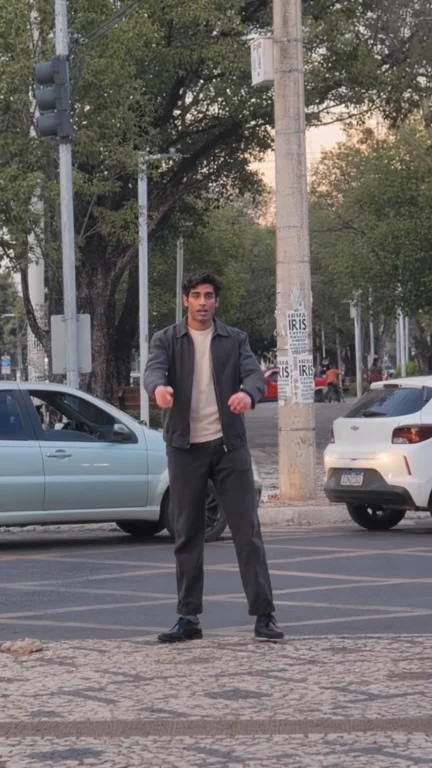
The opening keeps the whole dancer in frame, shoes and all. As traffic moves behind them, a small shift in stance sets up the first arm hit.
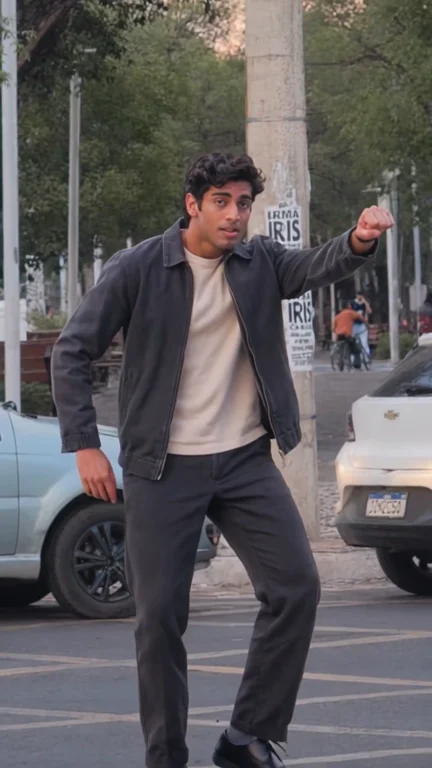
The camera cuts in as one fist comes forward. The arm hit is sharp, while the knees keep a smaller bounce underneath it. The closer framing makes that difference easy to see.
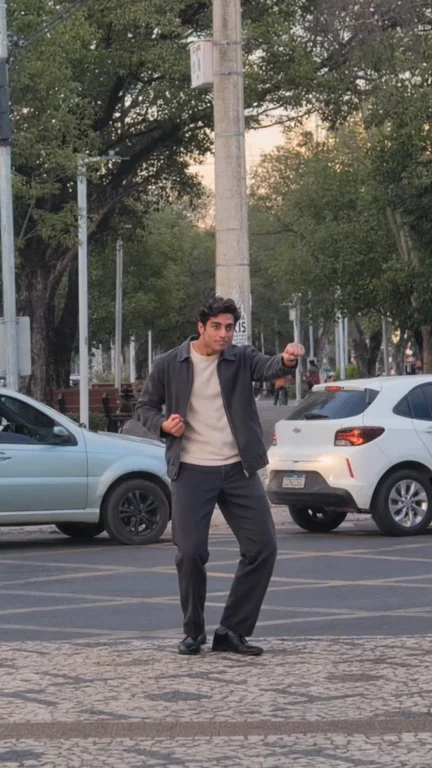
The frame opens up again so you can see where the weight lands. Watch the knees soften as the dancer shifts side to side over the patterned pavement.
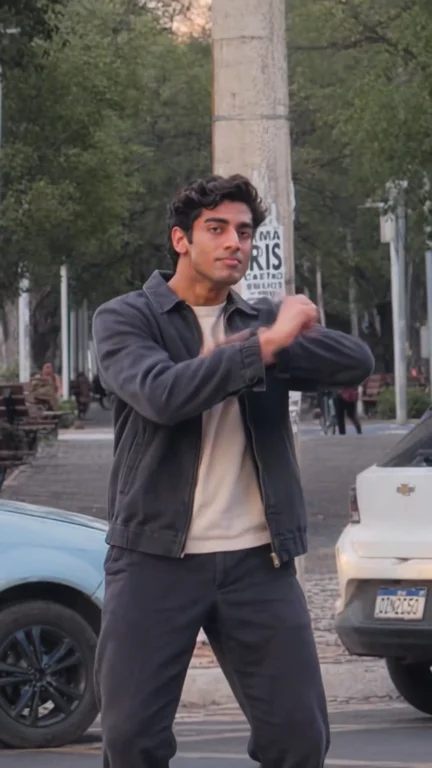
In the tighter shot, the fists roll across the front of the body as the shoulders keep time. The view widens again, bringing the dancer and pavement back into the same frame.
Hotel Lobby Street Dance AI is the solo sidewalk version of the Hotel Lobby Dance AI trend. One person from your photo takes the foreground role, with passing cars and patterned pavement setting the scene. The joke comes from seeing a familiar face stay composed while the fist hits, weight shifts, and wrist rolls land on the beat.
Both formats use the Hotel Lobby track. The street dance has one dancer and alternates between footwork and close-ups. The original COLORS performance has Quavo and Takeoff sharing a hanging mic in an orange studio. If you came for the outdoor choreography, the reference above shows the routine this generator follows.
Find Hotel Lobby Dance on TikTokStart with what you want viewers to recognize first. A familiar face pays off in the close-up, and a distinctive outfit reads from the opening wide shot.
Use a full-body photo in your everyday jacket and sneakers. Let the opening wide shot play before adding the caption so the first fist strike becomes the reveal.
Ask a friend for a portrait they are happy to use. Pick a photo with the expression or jacket your friends will recognize as soon as the camera cuts closer.
Choose a standing photo where the jacket, trousers, and shoes read clearly. On the first watch, look for the outfit in the wide framing. In the close shots, check the details that make it recognizable, such as the jacket shape and sleeve color.
Upload one JPG or PNG up to 10 MB. A standing photo gives the wide shots a clearer clothing and posture reference, while a sharp portrait helps your face read in close-up.
Watch the reference to check the sidewalk setting and camera cuts, then confirm you can use the photo. Choose 480P for a quick share, 768P for a sharper everyday export, or 1080P for a higher-resolution file to edit.
Sign in and use the credits required for your selected quality. You can top up if your balance is short. Once the job starts, follow its status on the page or in My Videos.
Watch the finished clip once through with sound, then download the MP4. Check the first arm hit, the face in close-up, and the shoes in the wide framing before sharing.
Upload a photo to use the ready-made template. If you want to describe your own street-dance variation in a prompt-based video tool, start with the example below.
Create a 14-second vertical street-dance video featuring the person in the uploaded photo. Set the scene on a patterned city sidewalk with passing cars in the background. Open on a steady, head-to-toe shot as the solo dancer shifts weight and finds the beat. Cut closer for two sharp forward fist strikes, return to a wider view for the footwork, then frame the dancer from the waist up for a rolling wrist move. Keep the expression composed and the face, outfit, and daylight consistent across cuts. Leave enough room in the wide shots to see both shoes.
The full-body shots need a recognizable silhouette, and the close shots need a legible face. A standing portrait in even light gives the dancer both.
The two Migos members released Hotel Lobby (Unc & Phew) as a duo on May 20. The label announced the single alongside the official music video.
Universal Music release ↗A COLORS SHOW put both artists at a shared hanging mic. The orange backdrop is a quick way to recognize that performance.
Official COLORS performance ↗COLORS reported in October that AI remakes of its duo performance had spread the month before. The same song also gives the solo street-dance format its name.
COLORS newsletter ↗The 14-second reference above shows the outdoor solo format used by this generator. Listen for the track underneath the arm hits and use the four frame stills to follow the change from footwork to close-up.
| Feature | Your download |
|---|---|
| Dancer | One person from your photo in the foreground. The scene uses the same dancer in wide and tight shots. |
| Street scene | Patterned sidewalk, passing traffic, and the alternating views of footwork and upper-body moves. |
| Choreography | The reference supplies the stance changes, forward fist strikes, and rolling arms. Your photo supplies the person performing those moves. |
| Timing and sound | The reference edit supplies the rhythm and soundtrack for the 14-second clip. |
| Video format | 9:16 MP4 in 480P, 768P, or 1080P. Facial and clothing details can vary between AI outputs. |
When the result comes back, watch the wide shots for the outfit and foot placement, then pause on a close-up to check likeness. If small details drift across a cut, a sharper portrait with simpler clothing is a better starting point for another attempt.
Try a photo that shows the same identifiable clothes from shoulders to shoes. Strong color blocks are easier to carry across camera cuts than small prints.
Use a sharp, evenly lit photo with your eyes uncovered. Crop empty space first while leaving the head, hair, and shoulders in frame.
Sign in to the same account and open My Videos. The job runs after you leave the generator, and the finished clip appears there.
Play the downloaded file first and note where the first arm hit lands against the included audio. If you replace the track in a video editor, slide the new audio until that beat lines up before trimming the clip.
The Hotel Lobby Dance AI meme works because the opening looks like an ordinary moment on a busy sidewalk. Then the first fist strike lands and the dancer keeps a straight face. Give the opening enough time to set up the joke, then let the camera cut or the beat deliver the punchline.
Put a familiar situation over the opening wide shot, such as “When someone says we can leave early.” Let the arm hit answer the caption. Keep the text short enough to read before the camera comes in.
Use a photo of yourself or a friend who wants to appear. Start with a caption about running an everyday errand and let the close-up reveal who is dancing. Try the edit in your group chat before adding any more text.
Pick a resolution in the generator. Pay once or use credits already on your account.
Make my Hotel Lobby danceUse your credits on this template or any other LivelyReel template.
100 Credits
Try your first video
300 Credits
For a small batch of ideas
1,000 Credits
More credits for regular creators
Hotel Lobby Dance AI puts the person from one uploaded photo into a solo sidewalk routine set to Hotel Lobby. The 14-second reference alternates between full-body shots for the footwork and closer shots for the arm hits and facial expression. Use the preview to check the sequence before you upload.
The trend takes its name from Hotel Lobby (Unc & Phew), the 2022 single by Quavo and Takeoff. The preview lets you hear the reference edit used for this template.
Hotel Lobby Street Dance AI follows a one-person dance on a sidewalk. The COLORS duet features Quavo and Takeoff trading lines at a shared mic in an orange studio. The two formats share a track, while the outdoor version here has its own choreography, camera cuts, and single-photo setup.
Upload one photo, confirm you have permission, choose a resolution, and start the job. Download the finished MP4 from this page or My Videos.
Use a photo of a friend or another person when you have permission to use their likeness this way. Pick a picture showing them clearly so the correct dancer is identifiable.
This template has one dancer slot. Crop a group photo down to one consenting person and keep their face, hair, and shoulders inside the crop.
A head-and-shoulders shot can work for identity. A clear standing shot with shoes gives the generator more information for the full-body views.
The edit follows the visible look of your photo across the dance. If shoes, trousers, or other details fall outside the picture, the generator fills them in.
This template uses the sidewalk choreography, its camera cuts, and its soundtrack timing. The photo controls the dancer’s appearance.
The Hotel Lobby Dance AI template generates the MP4 directly from your photo. The optional prompt example is for creating your own variation with a prompt-based tool. Open the finished video in CapCut afterward if you want to add a title, captions, or a shorter cut.
The finished video runs 14 seconds in a vertical 9:16 frame. The wide shots still show the dancer’s feet within that portrait canvas.
Yes. Choose 1080P to download a 1080 × 1920 vertical MP4.
480P starts at $2.99 or 30 credits. 768P is $7.99 or 80 credits, and 1080P is $11.99 or 120 credits. You can use a sufficient existing credit balance.
Yes. Processing continues after you leave. Sign back in with the same account and check My Videos to see its status or download the result.
The credits spent on the failed job are returned. Check My Videos for the result before starting a fresh job.
Use Download MP4 after the job finishes. Import the vertical file into the platform’s composer and check that its caption and interface do not cover the footwork.
You can mute or replace the soundtrack in your editor or the destination app. Align the opening beat before posting so the first arm strike still lands on time.
The purchase covers video generation. Use photos you have permission to use, make any required AI disclosure, and check the platform’s music terms for your post.