Play it straight
Use a neutral portrait and save your caption for the press-room shot. A calm look makes the second scene feel like an official response.
Put one person in both scenes of The Box with a single portrait. Perform under the parking-lot lights as a yellow car flips, then take the microphone in front of a blue curtain.
Cast your performer
One clear portrait for both scenes.
JPG or PNG, up to 10 MB.
Credits return to your balance if generation fails.
The camera pulls away as the performance grows, then resets to a straight-on shot at the lectern. The stills below are from the reference edit.
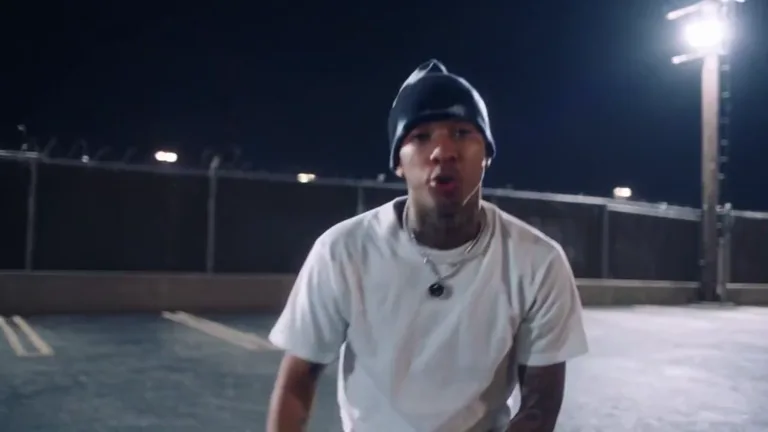
The performer starts close enough to read their expression, with the parking-lot fence and lamps framing the shot.
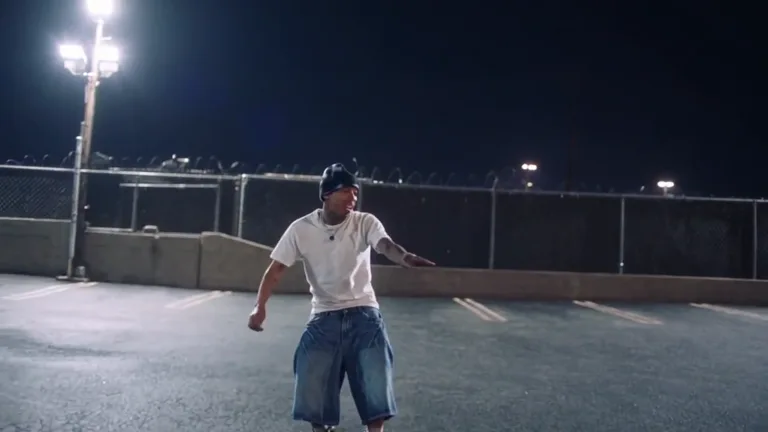
The camera backs away until you can see the stance, footwork and wide arm swings.
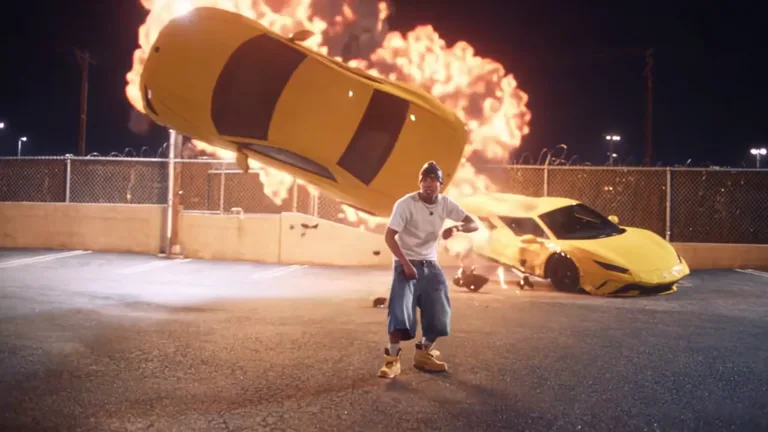
The stunt climbs behind the dancer. Keep watching the foreground as orange fire gives way to gray smoke and the picture softens.
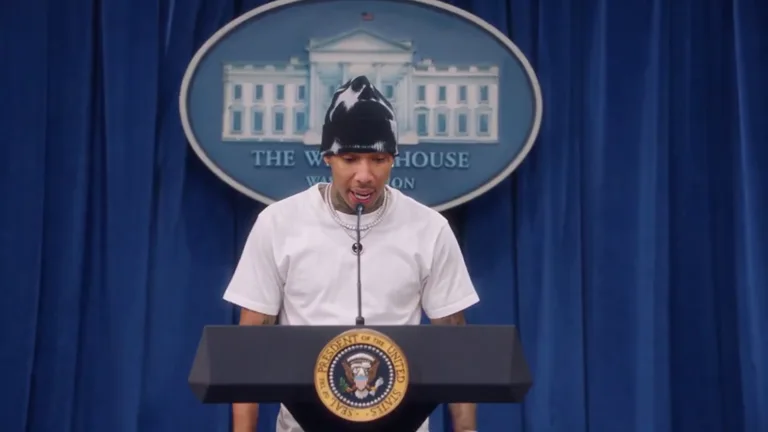
The next shot centers the same performer between blue curtains, with smaller gestures around a single microphone.
The parking-lot scene lets the background get absurd while the performer keeps their rhythm. The abrupt switch to a symmetrical briefing shot sets up the “I'm a 2020 President Candidate” line and makes the same person look ready to explain everything that just happened.
Search TikTok for The Box AI podium edits and look for the moment the picture cuts from the lot to the microphone. The timing of that cut is what makes each caption read differently.
Search The Box AI podium on TikTokStart with a portrait and pick what the audience should recognize when the frame widens and when the camera returns to the face.
Use a neutral portrait and save your caption for the press-room shot. A calm look makes the second scene feel like an official response.
With their permission, cast the friend who always volunteers to explain your group's plans. Send the clip as a reply to the next change of schedule.
A work jacket, bright shirt or distinctive glasses give viewers a clear visual detail to follow from the dark lot to the blue curtain.
Your upload supplies the lead's face, hair and visible clothing for the dance and the microphone shot. If the photo ends at the waist, the wide shot fills in the rest of the outfit.
Choose one person whose face and shoulders are clearly visible. The same person performs in both scenes.
Use a clear picture of yourself or someone who gave you permission. Look for visible eyes, hair and shoulders.
Select 480P, 768P or 1080P. All three use the same two scenes and the same widescreen framing.
Confirm photo permission and use an existing credit balance or buy the credits for the selected tier.
Review the face near the opening and immediately after the podium cut. Download the MP4 from the result or My Videos.
Use this prompt as a starting point for a custom recreation in a tool that accepts a portrait and a motion reference. The generator above already has its two scenes set up.
Cast the person in my portrait throughout a short widescreen edit. Begin at face height in a floodlit parking lot and widen to the dance. Keep the yellow-car stunt behind the performer. Cut to a blue-curtain lectern and continue with the same face, hairstyle, clothes and accessories. Match the reference pacing and keep the microphone in front of the speaker.
The opening and the lectern show the face clearly. The lot widens soon after, so clothing and silhouette matter too.
Roddy Ricch included the track on Please Excuse Me for Being Antisocial. The official audio credits Atlantic Recording Corporation.
Official audio ↗The music video moves through different sets, including the blue-curtain briefing scene that supplies the visual setup for the candidate meme.
Official music video ↗Meme accounts brought the podium shot back with deliberately misspelled versions of the line, including “candidih.”
Meme archive and dated examples ↗The preview on this page is LivelyReel's two-clip reference edit for the photo template.
| Element | What to expect |
|---|---|
| Appearance | The person in your portrait plays the lead in the lot and at the lectern. Clothing outside the photo may be inferred. |
| Setting | Night floodlights, a yellow-car stunt and the hard cut to the blue-curtain briefing room. |
| Performance | The edit follows the reference rhythm and camera framing. Fine hand and mouth movement can vary. |
| Audio | The assembled clip uses the reference edit's soundtrack. |
| Format | 13 seconds in a 16:9 MP4. |
| Resolution | 480P (854 × 480), 768P (1366 × 768) or 1080P (1920 × 1080). |
When you review the download, pause on the opening and the lectern close enough to compare the face, hair and top. Watch the stunt through once at normal speed to check the timing.
Try a photo with less contrast across the face. View the opening and podium at full size before judging the wide stunt shot.
Use a portrait that shows more of the outfit, including its color and neckline. A head-only crop gives the generator less detail to carry over.
Play the original download before adding effects or changing playback speed. AI mouth articulation varies by take.
Open My Videos to check the latest status. The result stays in your account if you leave this page.
Pick a caption point before you post. These lines can go in your post or be added with your editor.
Place the setup over the wide shot while the viewer can still see the car. Let the briefing cut deliver the response.
Hold the caption until the blue curtain fills the frame. A short statement reads more clearly while the performer is centered.
Choose your resolution in the generator. If your balance covers the selected tier, use your credits directly.
Make my The Box videoUse your credits on this template or any other LivelyReel template.
100 Credits
Try your first video
300 Credits
For a small batch of ideas
1,000 Credits
More credits for regular creators
It casts the person in your photo in a two-scene edit inspired by Roddy Ricch's The Box. The edit moves from a night parking lot to a press lectern.
Yes. The lyric at the press lectern is “I'm a 2020 president candidate,” from Roddy Ricch's The Box. This template pairs that podium shot with the parking-lot performance.
The Box is by Roddy Ricch. It appeared on his 2019 album Please Excuse Me for Being Antisocial.
One photo is required. The person in it appears in the dance and the briefing.
Crop the picture to the single person you want in the edit before uploading. Keep their hair and shoulders in the crop.
Upload a photo showing the clothes you want carried into both shots. The wide scene may infer clothing below the crop.
Upload one JPG or PNG up to 10 MB. A sharp, evenly lit portrait with a visible mouth works well.
Make the video in your browser from a photo and a quality choice. The copyable prompt is for people making a separate custom version.
The template plays the parking-lot scene first and the lectern scene second. You can rearrange or trim the downloaded MP4 in your own editor.
The performance follows the reference timing, with AI variation in individual mouth shapes. Review the speaking shot before sharing.
The download runs 13 seconds and includes both scenes.
480P is $2.99 or 30 credits, 768P is $6.99 or 70 credits, and 1080P is $10.99 or 110 credits.
Choose 854 × 480, 1366 × 768 or 1920 × 1080. The export is widescreen at every tier.
Usually ready in 3–10 minutes. Busy periods may take longer. We'll email you when it's finished.
Use Download MP4 when the video is ready. You can return to My Videos later to view and download it.
The credits charged for that generation return to your balance. You can check the status in My Videos.
The template exports 16:9. For a vertical version, use an editor to fit the full widescreen image on a portrait canvas so the car stays in view.
Use a photo and likeness you have permission to use. Check music rights for how you plan to share the clip and follow the posting platform's AI labeling rules.